
Hi! I'm a product manager specialising in product launches. These days I mostly work with early-stage startups where the entire "product team" is me plus a couple of contractors on hourly rates. So before anything goes to design or dev, we build and test prototypes—that way we can validate requirements with real users early, get founders to sign off on the concept, and avoid paying for unnecessary iterations down the line.
But AI prototyping can be expensive too. I've seen Reddit threads about people burning through 400–500 or more Lovable credits on a single prototype—that's a real chunk of money. I've figured out how to keep it around 100 Lovable credits (for scale: we recently built a CRM for event management—22 screens plus around 10 modals (pop-up windows like forms and confirmations)). Here's exactly how I do it.
Step 1. Documentation, or the secret prompt that doesn't exist
I've heard it so many times: there's some magic prompt out there, find it and everything just works. I even attended webinars where people said: "Copy my prompt, paste it in, now you know how to use the tool." Honestly, I find that approach a bit misleading. So let me walk you through what actually worked for me.
I don't write the briefs for screen generation myself; I use Perplexity for that. (You can pick different models, but honestly I haven't noticed much difference between GPT, Sonar, and Claude for this kind of task, as writing a spec is pretty standard stuff.)
I upload the main screen flow I've mapped out in Miro (I skip error screens and modals and upload just the core sections), describe the product (event management CRM), and mention a few industry references to get a sense of the feature and flow direction in this space.
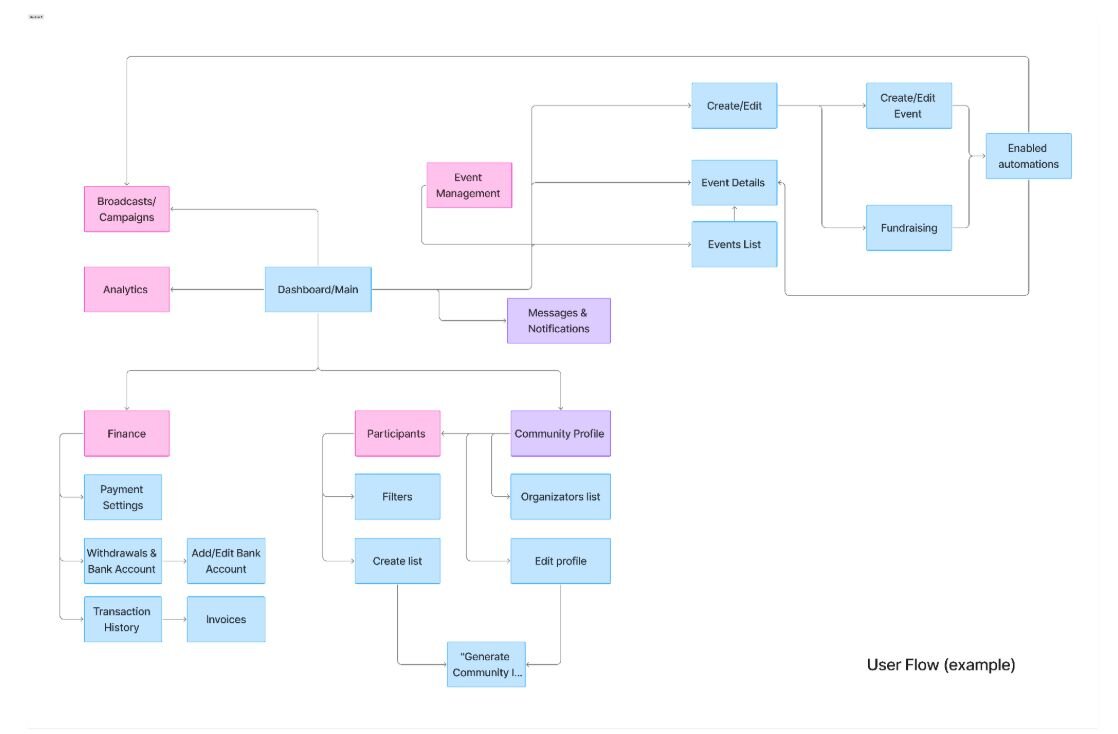
Then I ask it to write a User Story (a short description of what the user can do on this screen) for each screen in this format:

I check that all the User Stories I need are covered and nothing extra slipped in.
Then I ask it to write a UX Pilot prompt for each screen. I only use that prompt for the first iteration. After that, I write all edits myself, directly in UX Pilot, in plain language. I tried running revisions through AI, but it created more problems than it solved: it took way longer (upload screenshot → double-check → be disappointed), I kept losing track of where things stood, and following the edits across iterations got genuinely painful.
Step 2. UX Pilot for design
You can use any tool that generates mockups here. The main point is: don't do this in Lovable. Its design sense isn't great, and every iteration costs money—and trust me, someone on your team (the PM, the founder, or the client) will want to try five different versions.
So I do design in UX Pilot. Pricing: $29 for 1,200 credits.
- Generating a screen from scratch—6 credits
- Full screen revision (3–4 edits)—6 credits
- Small area edit—3 credits
- *UX Pilot has a free tier, but it doesn’t support Figma export and comes with a limited number of credits
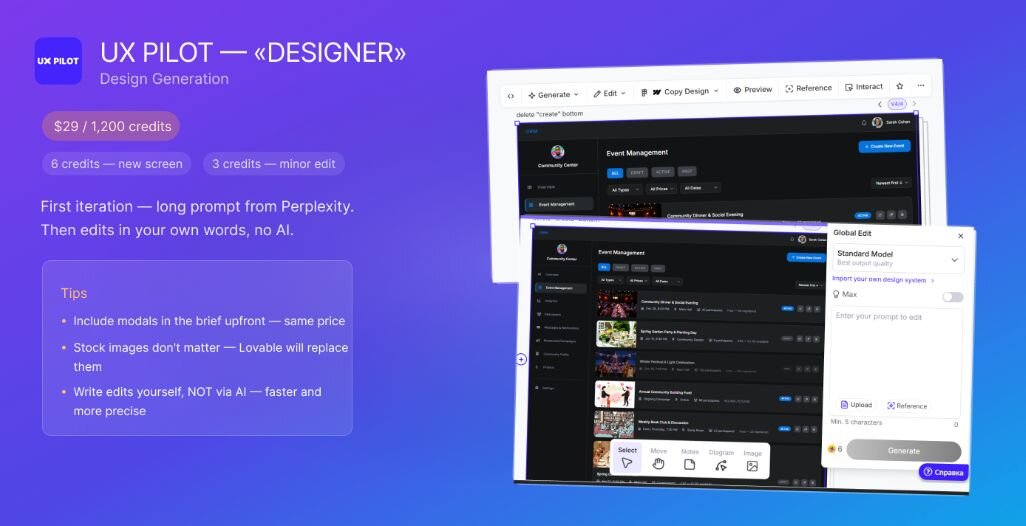
A couple of tips:
If your screen has modals (add participant window, "are you sure you want to send this?" confirmation, etc.), put them in the brief upfront. UX Pilot charges the same whether it's a clean screen design or an HTML page with animations and modals.
Don't care about the stock images UX Pilot pulls in; they'll be replaced anyway once you move to Lovable.
Total: we generated 22 screens, averaging 5 full iterations per screen (some took 2, some took 7–8). That's 5 × 22 × 6 = 660 credits.
The other half of the credits went to founder wish lists. As always.
Step 3. Finally, Lovable
I almost always bring a full package into Lovable:
- HTML from UX Pilot (when needed for structure, modals, and states)
- Figma mockups (without these, everything looks completely different—Lovable doesn't reliably pick up design from HTML alone)
- UI Kit (colours, fonts, components). Note: it will distort things anyway, but when the output isn't too far from your brand guidelines, it's much easier to get stakeholder sign-off on the prototype.
I give all of this in PLAN mode (and every time before generating anything, I re-submit the request and files in Plan first, then approve the generation).
In Plan mode I check that it actually read all the files, understood what the product is, and asked me clarifying questions.
Then we split the work and generate by user flow, re-attaching the files and Figma for each flow. For the CRM prototype, that meant: first all the steps for creating an event, then the event card and its parameters, then the participant database tab, then the messaging and notifications tab.
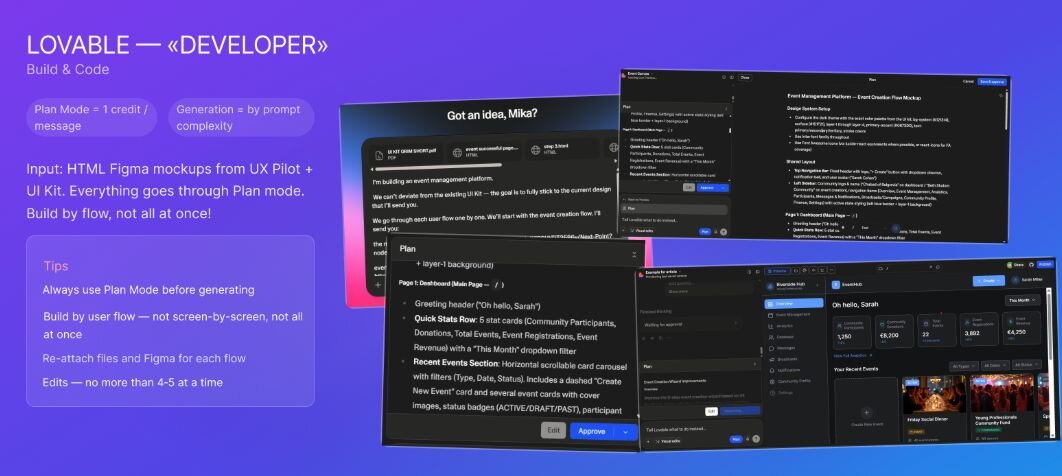
Why this way? Lovable charges credits like this: Plan mode is 1 credit per message, and for generation it looks at prompt complexity.
Here's the logic.
If you're building an event creation flow with 5 steps (registration form, ticket setup, participant approval rules, automated notifications, publication settings)—you can define the event entity and its parameters upfront. The screens will likely share components, so Lovable reuses frames instead of rebuilding everything.
If you go screen by screen, you spend 1 credit per message just to set up each prompt (fine), but the prompts get more complex because you keep referencing old files and figuring out what to reuse. It adds up.
BUT if you dump everything in at once, quality suffers, Lovable treats the prompt as complex (so you don't save much), and, worst of all, you end up collecting edits across every single screen. That's your time, and your time is also money.
Also, Lovable doesn't handle a wall of revisions well, so give it 4–5 at a time max. When I give it 10, it quietly ignores 4 or 5 of them. Going flow by flow is the sweet spot.
Quick recap: How to build a prototype
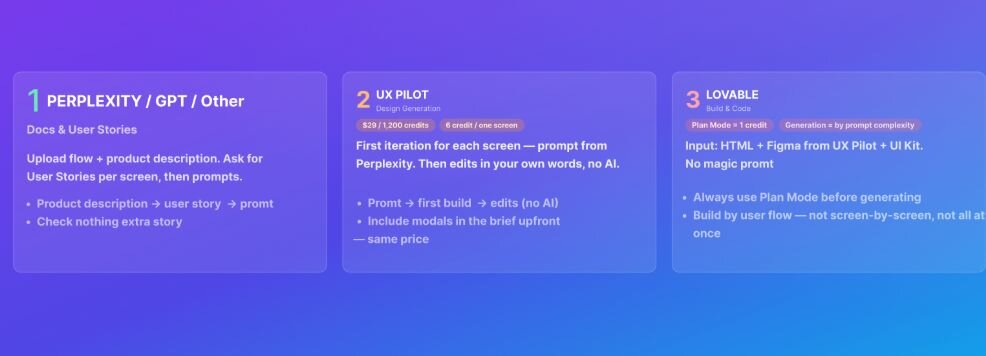
- Perplexity—the "tech writer/analyst": turns your rough flow and requirements into a proper brief. Feed it the flow and overall vision, get User Stories first, then prompts for each screen after you've signed off.
- UX Pilot—the "designer": generates screens and builds out the visual layer against your flow and brand. First pass uses the long Perplexity prompt; edits are done by human brain.
- Lovable—the "developer": assembly and code. Plan mode first, then build. Go flow by flow, max 5–6 edits per round.
The punchline
In startups, AI tools are genuinely great—they make alignment faster and let you validate prototypes before handing off to expensive specialists. But the irony is that AI tools still need a manager with a clear product vision to get anything useful out of them.
