
Most teams treat the first 90 days after an AI launch as a celebration. The smart ones treat it as a diagnostic sprint applying what I call the TRUST Framework (Targeted use cases, Reliable metadata, User-aligned prompting, Scalable evaluation, Trust through governance) - where structural problems are still fixable and the cost of fixing them hasn't yet compounded.
In 2024, a grieving passenger bought a full-price airline ticket after a chatbot assured him he could apply for a bereavement refund later. The airline refused. The tribunal ruled: you own what your AI says.
That's the kind of AI failure that makes headlines. But the failure mode that keeps product managers up at night arrives slowly. Testing goes well. The demo lands. Launch numbers look promising. Then, bypass rates tick up, power users drift back to spreadsheets, and support tickets repeat the same complaints. Usage declines until someone asks:
Should we shut this down?
The first 90 days aren't a finish line. They're a diagnostic window where real users reveal whether you built the right thing and whether trust can survive reality.
Before we go further, three terms you'll see throughout this piece:
RAG (Retrieval-Augmented Generation): An AI architecture that answers questions by first searching your documents, then generating a response from what it finds, like an open-book exam, instead of relying on memory.
Chunking: The process of splitting documents into smaller pieces so the AI can search them. How you split matters: break a table across two chunks, and the AI returns half an answer.
Retrieval layer: The search engine underneath your AI, the part that finds relevant documents before the model generates a response.
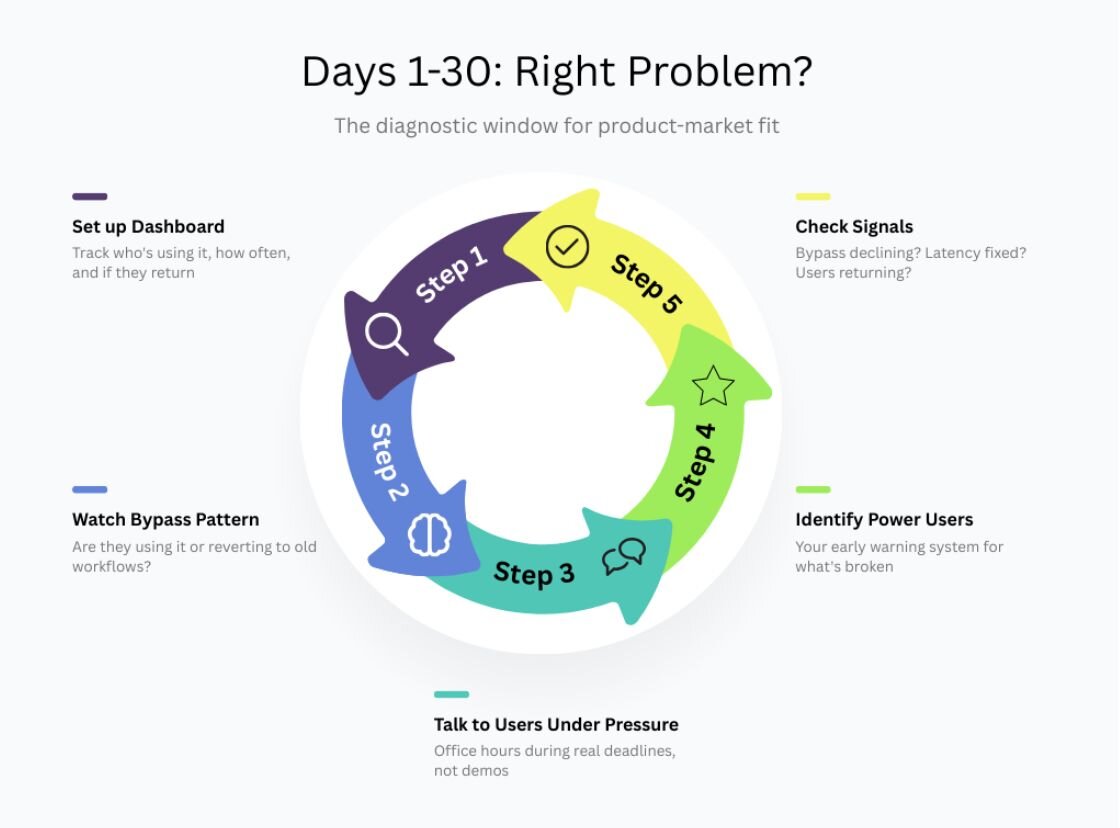
Days 1-30: Are we solving the right problem?
The bypass signal
How many users have access to your AI feature but choose not to use it?
I evaluated a consumer technology platform serving 26 million users and handling 8 million queries per day. Their AI support chatbot hit a failure that impacted one million users within an hour. A customer asking about Retailer A's return policy was getting answers pulled from Retailer B's documents. The system was searching the entire knowledge base instead of filtering to the specific retailer the customer was chatting with. Once the team tagged every search with the retailer's identity so results could only come from that retailer's documents, the issue was resolved. But the trust damage was already done: support tickets spiked and bypass rates jumped.
In a separate government deployment, the problem was subtler. Accuracy benchmarks looked strong, but two weeks in, analysts were querying the system and then immediately opening the original document to verify every answer before using it. The issue wasn't accuracy, it was provenance. Without source citations, analysts couldn't defend AI-assisted work in briefings. Think about why Perplexity works: every answer comes with numbered source links so you can verify before you trust. Once the team added the same pattern, in-app citations with source titles, authors, and dates, the verify-then-use behavior dropped and analysts began trusting the output directly.
When bypass rates stay high after week two, it's usually one of three things: users don't know the feature exists, it's too slow, or they don't trust it for work that matters.
Set up the adoption dashboard
In week one, track who's using the feature, how often, and whether they return.
Look for clusters. If one department uses it heavily while another ignores it, you've built something that works for a specific workflow, not a general solution. That's fine, but you need to know which workflow before you scale.
Teams often discover their AI assistant works for junior staff doing routine tasks, while the senior users leadership expected to benefit most never adopt it. Those users ask different questions requiring more nuance than the retrieval system handles.
That insight comes from watching adoption patterns for two weeks. If you wait until month three, you've already lost the window where the fix is simple.
Talk to users under pressure
During office hours for an internal knowledge assistant at a mid-size law firm, an attorney preparing for a client meeting asked "what's our policy on data breach notification?" The system returned the firm's general privacy policy.
She rephrased: "client notification timelines after a breach." Got the same generic answer. Rephrased again: "GDPR 72-hour rule for our EU clients." Finally got what she needed.
Three queries for one answer.
The system had the information. The problem was disambiguation: "data breach notification" maps to different policies depending on jurisdiction, client type, and regulatory regime. After adding a one-step clarification prompt, the rephrasing pattern dropped.
You learn this by watching people use your feature when stakes are high, not from usage logs.
Power users as early warning
By week two, identify your heaviest users. The top user by query volume often isn't using the system for actual work-they're testing edge cases, building confidence before trusting it. If power users are still in "testing mode" by week three, you haven't earned trust yet.
What to fix
Discoverability: Move the AI where users already work. Latency: Anything over three seconds feels broken. Trust signals: Show sources, update dates, access controls.
By day 30, bypass rates should decline, latency should no longer dominate complaints, and users should return after first use.
Days 31-60: Is the foundation solid?
Categorize every query
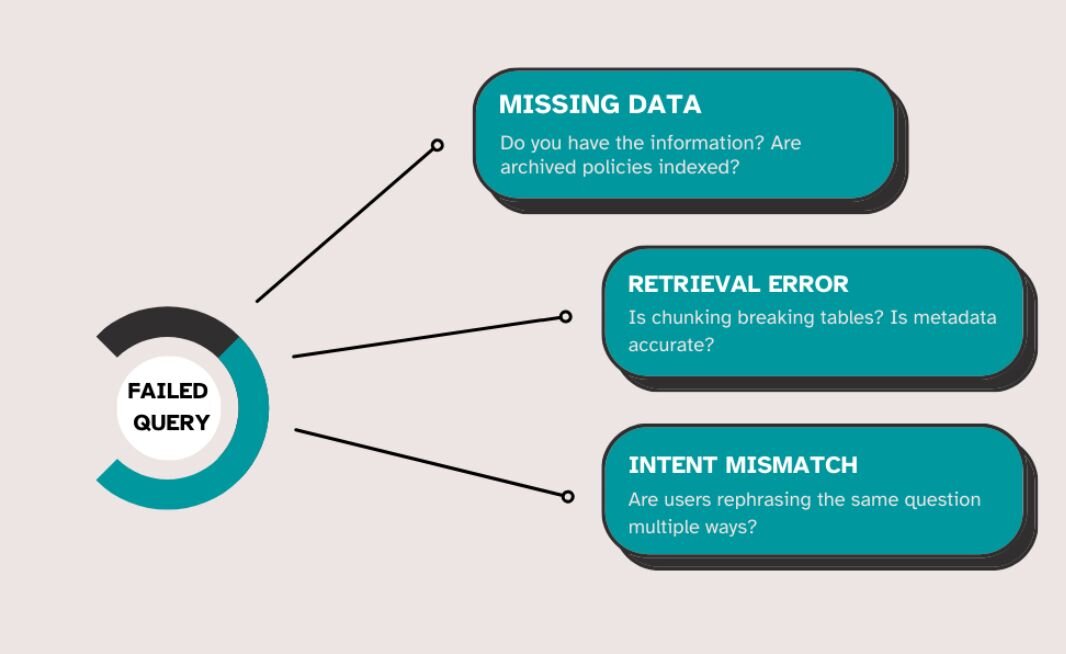
Pull every failed query from the first 60 days and sort them: answered well, missing information, or misunderstood intent.
A healthcare system I studied was processing over 8,000 correspondence files per month across 50 to 70 document types. When the team analyzed their failed queries, they clustered into three distinct buckets:
- 44% were missing data
- 31% were retrieval problems where data existed but couldn't be found, and
- 25% were intent mismatches where the system misunderstood what users were asking.
Those are three completely different fixes.
Missing data: The team wasn't indexing archived policies. Someone assumed "current policies" was enough. In regulated environments, it never is. Sometimes the issue is even subtler: users see "no results found" when the real problem is access controls, not missing documents. Once archived policies were added and permissions surfaced clearly, failure rates on policy queries dropped by more than half.
Retrieval problems: The chunking strategy was breaking tables across multiple chunks, so the system returned partial information without context. Extraction accuracy had dropped from over 90% on clean training data to roughly 70-75% on production inputs, because real documents were faxed, rescanned, or compressed in ways training data never represented. After rewriting chunking logic to keep tables intact, retrieval quality recovered.
Intent mismatches: Users asking "What's the difference between X and Y?" got separate definitions instead of comparisons. Adding query classification to detect comparison intent resolved the pattern.
Each failure type needs a different fix, and a different part of the pipeline to investigate.
Watch for rephrasing
As we saw in the law firm example earlier, when users rephrase the same question multiple times, that's a disambiguation problem. Add clarification options rather than forcing users to guess the magic phrasing.
Track edit rates
If users constantly rewrite responses, your system adds work instead of saving time.
High edit rates often get blamed on model quality. But most edits are formatting-adding structure, adjusting tone. After adding output templates with style options, edit rates drop.
Separate format problems from content problems. Different fixes.
By day 60, query failures should cluster around fixable problems. Edit rates should decline. Users should stop rephrasing questions multiple ways.
Days 61-90: Can we afford this, and is trust building?
The cost crisis
Teams discover their heaviest users cost more in infrastructure than their subscription generates. These are the most engaged users who've integrated the feature exactly as intended.
By day 61, usage patterns reveal cost concentrations. Set alerts for cost spikes and users driving disproportionate spend. If economics don't work: adjust pricing, cap usage, or redesign.
Set up monitoring
Track response quality over time, latency and token consumption, data integrity. Add "Was this helpful?" buttons-they generate more feedback than email because they're trivial to click.
Design fallbacks
For low confidence or high stakes, route to humans. Set thresholds for human review, human approval, and compliance review.
When AI fails, build graceful degradation. If retrieval fails, offer keyword search. If latency spikes, serve cached responses.
Test fallbacks regularly-not just "do they work" but "do users understand what happened?"
By day 90, costs should be predictable, silent failures rare, and trust signals moving up.But some failures never surface in your dashboards at all.
Taxonomy of silent failures
Some failures don't show up in support tickets because users don't realize anything went wrong. This is the most dangerous category and the most original diagnostic challenge in production AI. Every product team should build and maintain its own taxonomy. Here's a starting framework:
Low-confidence shown as confident: The system returns an answer but internally flags low confidence. Users see the answer with no indication it might be wrong. When teams audit these cases, a surprising number are factually incorrect but sound plausible.
Adding confidence thresholds helps: below certain confidence levels, the system shows "I found limited information on this. Here's what I have, but you should verify with primary sources."
Hallucinations when retrieval fails: The retrieval system finds no relevant documents, but the model generates an answer anyway based on training data. These are dangerous because they sound authoritative and have no source citations.
Add a retrieval quality check: if top retrieved chunks have low relevance scores, don't generate an answer. Show: "I couldn't find information about this in your documents. Would you like me to search a different source?"
Contradictions with known data: AI output conflicts with structured data elsewhere in the system. Pricing quotes that don't match the database. Contract terms that contradict template libraries.
Teams address this through contradiction detection-cross-checking outputs against sources of truth before displaying them.
Permission violations: The system surfaces information users shouldn't access, or fails silently because of access controls.
Adding permission logging helps teams identify when users see "no results found" but should see "you don't have access to this information."
Track these separately. A hallucination requires fixing your retrieval layer. A contradiction requires cross-checking against known data. A permission violation requires reworking access controls.
Lumping them as "AI errors" won't tell you what to fix.
Why this matters now
Everything in this article: watching bypass patterns, categorizing query failures, and building taxonomies of silent failures, is essentially the TRUST Framework in practice. If you followed the 90-day structure, you've already applied it.
It's been independently adopted by graduate researchers UT Austin and University of Houston for thesis work on production AI diagnostics, and by an engineer building an AI-native ERP for construction firms who used the framework to improve retrieval accuracy on bid package specifications through better metadata and chunking strategy. The deployments behind this article span government, healthcare, consumer technology, and structural engineering, and the patterns repeat across all of them.
The taxonomy of silent failures here is a practitioner-facing distillation. My full academic research identifies 33 distinct failure modes across seven pipeline stages, from ingestion through agentic orchestration, with evidence grading for each. That work is currently under peer review.
If you skip the diagnostic window and go straight to scale, you don't move faster. You just make the problems bigger.
