
For the past year, I've had six AI tools open at once, including ChatGPT, Claude, Gemini, DeepSeek, Cursor, and GitHub Copilot, bouncing between them depending on the task. Drafting PRDs, writing code, building prototypes, summarizing research and stress-testing roadmap decisions. AI had become as native to my workflow as Notion or Jira.
And I was doing it completely wrong.
The moment it clicked for me was a conversation with two friends who work at separate Big 4 management consultancies. I'd assumed firms like theirs would be drowning in AI. I mean, if there's an industry that runs on synthesizing information fast, it's management consulting. But both of them told me the same thing: commercial AI tools were either heavily restricted or outright banned. One had received an explicit instruction not to use them.
However, they were allowed internal AI systems, trained on company data, deployed under company control, air-gapped from the outside world.
That conversation stopped me mid-workflow. If some of the most analytically sophisticated organizations in the world won't touch the tools I use daily, what exactly am I handing over when I paste a user interview transcript into ChatGPT?
The problem isn't AI. It's where your data goes.
Most product managers I know use commercial LLMs the same way they use Google Search, casually, constantly, without reading the terms.
But when you search Google, you're retrieving information, while when you paste a document into a commercial AI chat interface, you're potentially contributing to someone else's training data.
The major providers OpenAI, Anthropic, Google, and DeepSeek have different policies, and they shift over time. But the default settings on most consumer-facing chat products are not built with your client's roadmap or your company's privacy in mind. They're built for scale.
As a PM, the things I was casually feeding into these tools included: competitor analysis with named clients, unannounced feature specs, user research with identifiable quotes, financial projections, and internal OKRs. None of it was encrypted. None of it was masked. I was just... typing.
What I actually use AI for as a PM
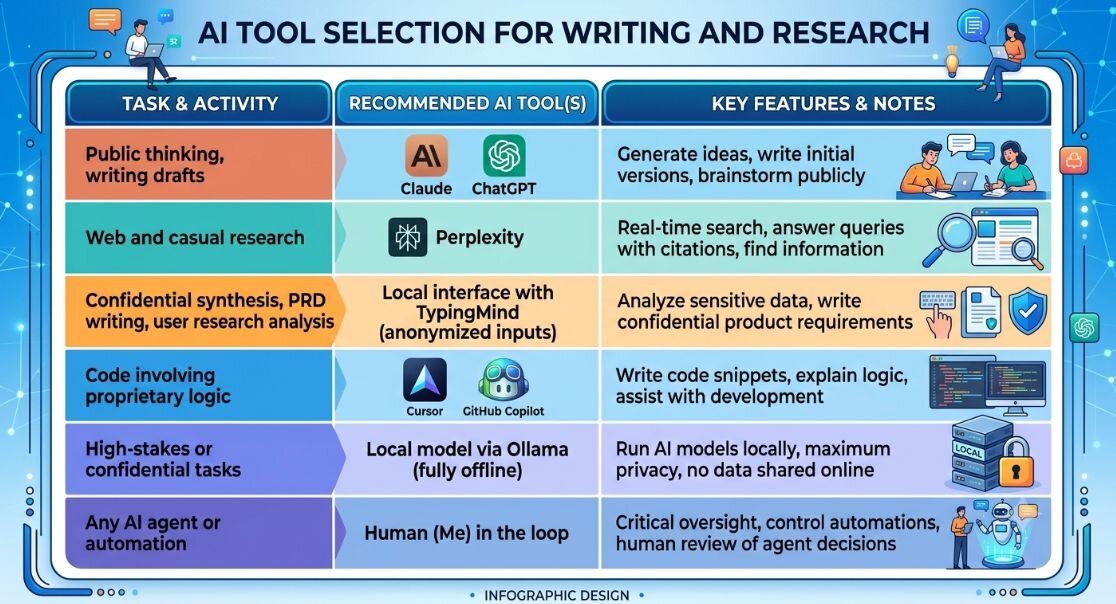
On any given day I'm using different AI tools for regular work tasks such as drafting PRDs using chatGPT and claude, writing SQL queries for product analytics on mixpanel, synthesizing user interview transcripts, generating competing hypotheses for roadmap decisions and building out product prototypes to test my hypotheses.
Cursor and GitHub Copilot handle most of my code-adjacent work: writing scripts, reviewing logic, catching bugs, refactoring code among others. Claude and ChatGPT do the heavy lifting on writing, reasoning, and research. Gemini handles anything from image creation and editing. I use perplexity for market research and Julius AI handles basic data analysis.
That's a lot of surfaces. And it's exactly why the security question matters because the more deeply AI is embedded in your actual work, the more sensitive the inputs become.
What I actually changed
I didn't stop using AI. That wasn't a realistic option, and frankly, it would've been a bad trade. The productivity gains are real. What I changed was the layer at which I interact with these tools.
- Switching to API access for sensitive work
The most impactful shift was also the least obvious one. The terms of service for developer/API access at both Anthropic and OpenAI are fundamentally different from their consumer chat products. Data sent through the API is not used for model training by default. Same underlying model, entirely different data handling agreement.
I now route anything confidential through a local interface. I use Typingmind, which stores conversation history on my own machine rather than in anyone else's cloud. The model is the same Claude or GPT-4 I was already using. The data never lives on their servers beyond the request itself.
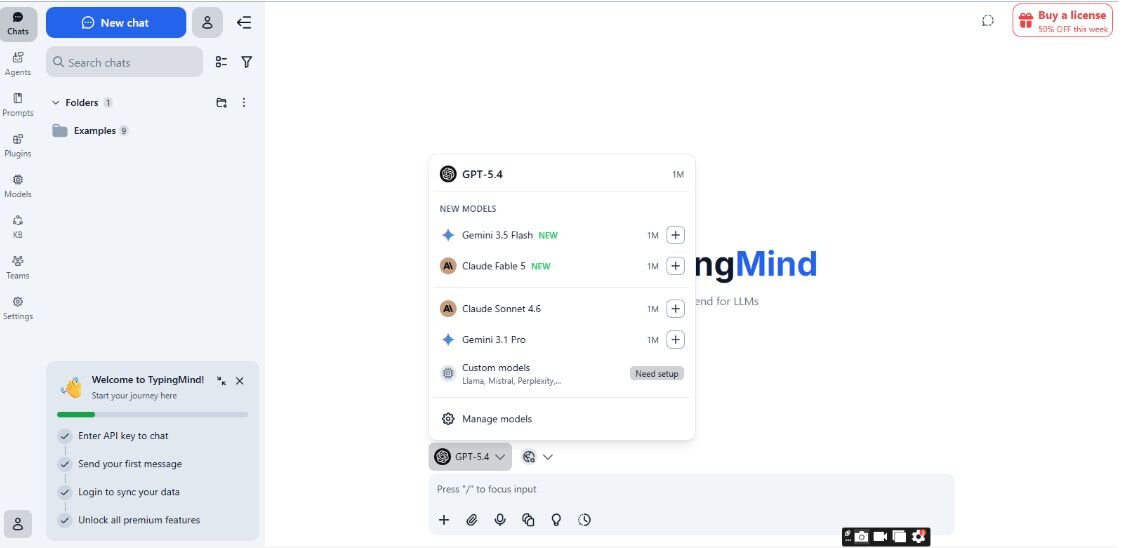
Setting up TypingMind as your private AI interface:
Step 1: Purchase and activate a license key Buy a plan on TypingMind.com. Your license key is automatically activated on your device, unlocking features like multi-model chats, plugins, and projects.
Step 2: Get your API key from your AI provider Go directly to your model provider, Anthropic, OpenAI, Google, etc. and generate an API key.
Step 3: Enter your API key in TypingMind In the left sidebar, click Models, then the gear icon next to your chosen provider. Paste your API key and enable the specific models you want to use.
Step 4: Start your first conversation Select a model and type your question or instruction in the message area. Your data is saved locally in your browser by default. Nothing is stored on an external server unless you choose otherwise.
Step 5: Set a system instruction to guide AI behaviour Go to Models → Global Settings → System Instructions. This tells the AI how to behave across every session( tone, scope, and personality) and persists even when the conversation gets long.
For a more detailed explanation, I recommend their official docs. It’s easy to follow: https://docs.typingmind.com/quickstart/get-started-with-typingmind
2. Data masking
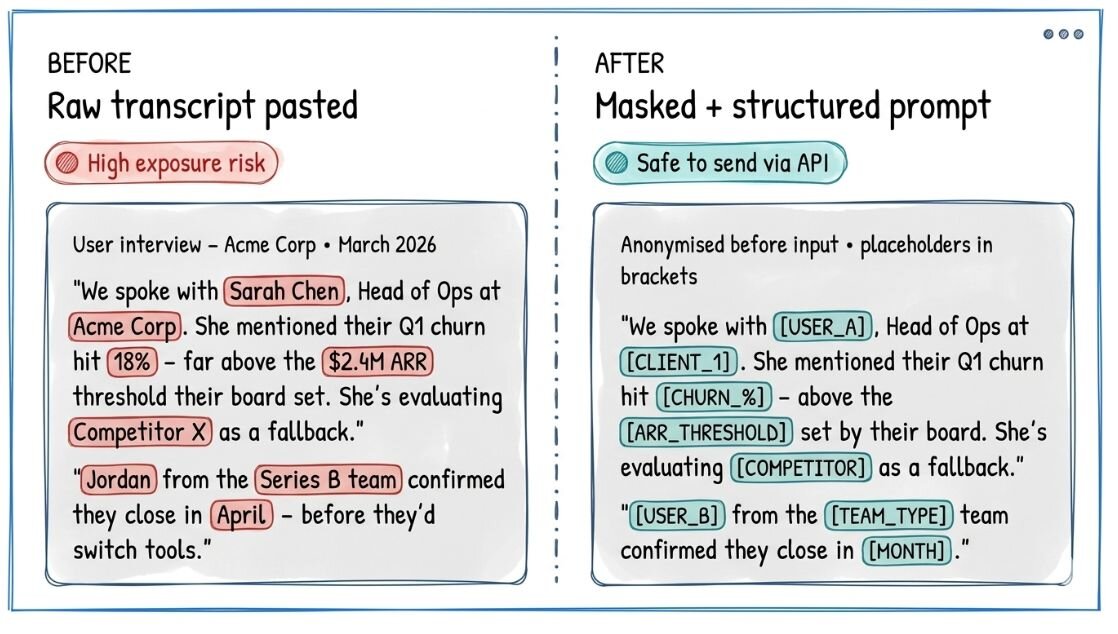
Even with API access, I anonymize data before I share. Client names become [CLIENT]. Revenue figures become [X_REVENUE]. Feature names get codenames. This sounds tedious but takes about thirty seconds once it's a habit, and it means that even in a worst-case breach scenario, the leaked text is meaningless without context I've kept offline.
I started doing this with Cursor and GitHub Copilot too. Both tools have legitimate access to your codebase but I'm deliberate now about which repositories I connect, and I've moved proprietary business logic to files that are explicitly excluded from AI context using .cursorIgnore file.
For github copilot, I turned off data training access, which allowed the model to use my code for training.
The image below shows an example of the data masking process.
3. Running local models for the most sensitive tasks
For anything you genuinely can't risk, I'd suggest switching to running models locally via Ollama. Llama 3 and Mistral are capable enough for most synthesis and drafting tasks. The data never leaves your laptop. There's no API call. There's nothing to intercept.
The quality ceiling is lower than the frontier models, but for confidentiality-critical work, that trade-off is straightforward.
4. Always requiring human approval on agentic tasks
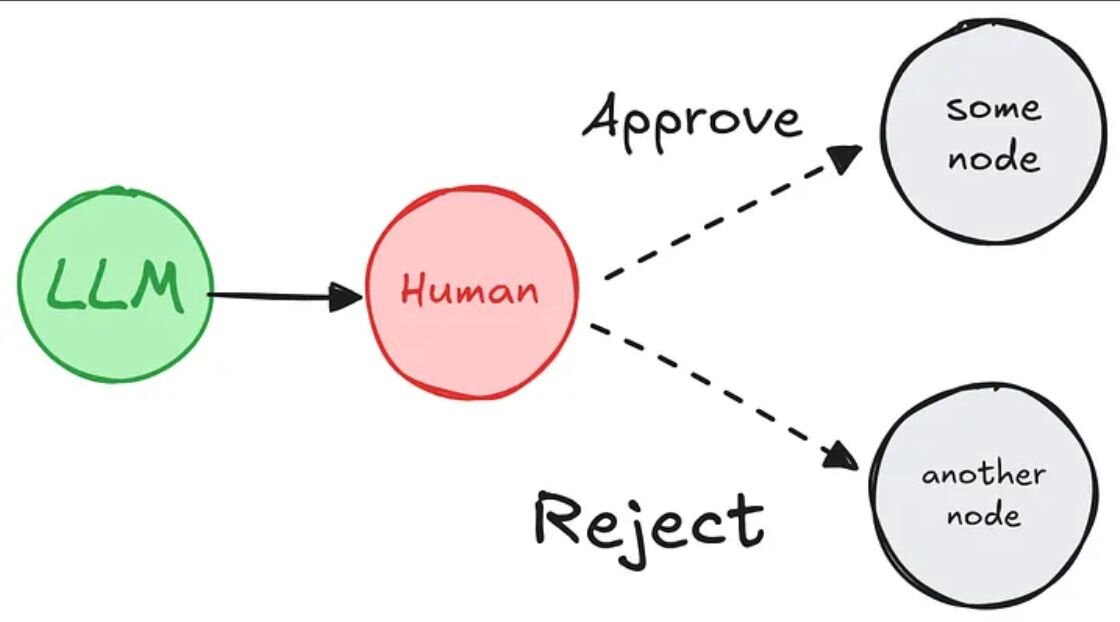
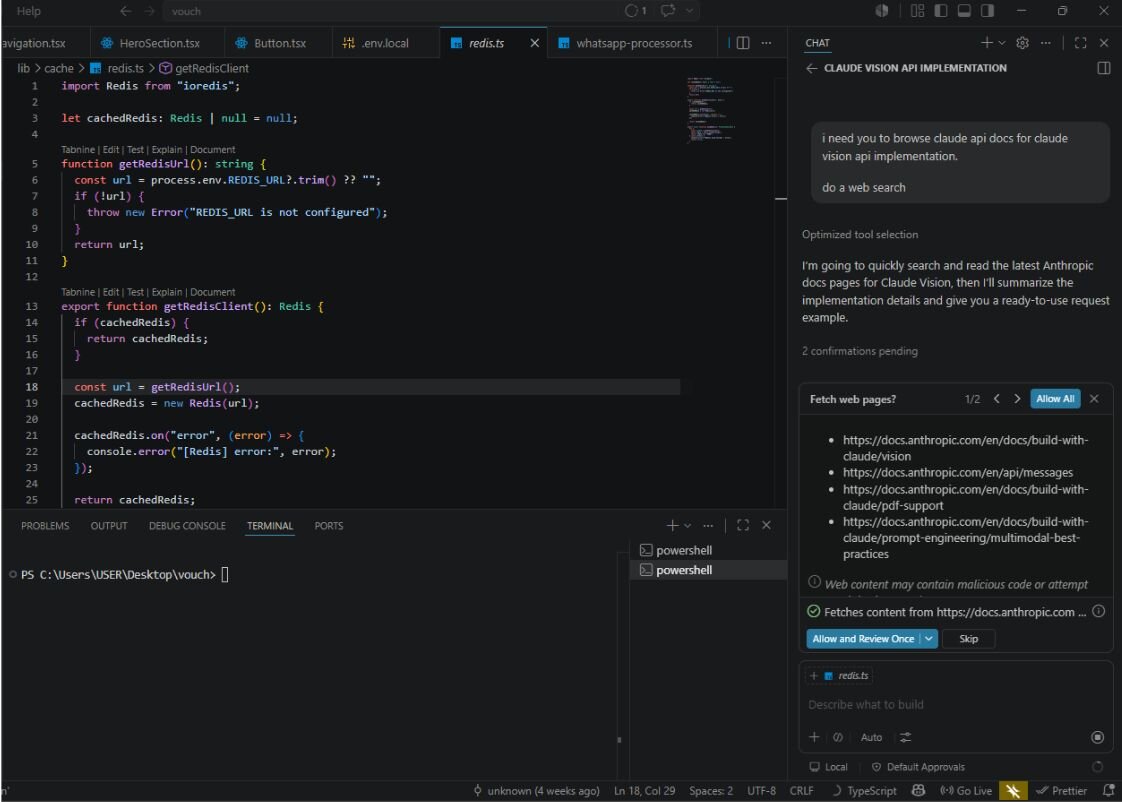
This one is newer, and it's become non-negotiable for me. As I've started building and using AI agents, meaning tools that can take actions, not just generate text. I've set a rule that nothing consequential happens without an explicit confirmation step from me. Sending an email, updating a Jira ticket, merging a pull request, pushing a code update or even performing external web searches in-between agent vibe coding sessions.
One mis-scoped prompt and an autonomous agent can cause real downstream damage. The approval gate costs two seconds and has already saved me from at least two embarrassing mistakes.
The PM-specific risk nobody talks about
There's a layer to this that's particular to product management. PMs sit at the intersection of engineering, design, data, sales, legal, and leadership. We are, almost by definition, the people in a company who touch the most sensitive cross-functional information. We're also, in my experience, among the heaviest AI users because we're the ones constantly context-switching, synthesising, and communicating.
That combination ( maximum information access, maximum AI usage, minimal security awareness ) is a genuine risk vector. And unlike engineers, who often have security tooling enforced on them, PMs largely self-govern.
The Big 4 firms figured this out and responded with control. Most of us are still copying and pasting and hoping for the best.
The question worth sitting with
I'm not arguing for AI abstinence. The productivity value is real, and abandoning these tools to feel virtuous solves nothing. But there's a version of AI adoption that's strategic and deliberate, and a version that's just enthusiasm without governance.
The organisations most resistant to commercial AI aren't necessarily behind. Some of them have simply done a more honest accounting of what data exposure actually costs and decided the productivity upside doesn't justify the default terms.
As PMs, we should be doing that accounting too, because product decisions set the tone for how teams work. If you're the person who shapes how your team builds, it's worth being the person who also shapes how your team thinks about what it shares.
The tools are good. The defaults aren't designed for you. Know the difference
