As a product leader, it’s easy to get wrapped up in the hype of AI. It’s not uncommon to feel the pressure, and it can be tempting to start shoe-horning AI into the product from fear of falling behind.
At the same time, we can see the potential AI has to help our users, and we probably want to make the most of that capability.
This article shows how applying user Jobs to Be Done to the Four Levels of AI Autonomy model can help identify where AI can best help customers in your product. The model allows you to consider the dimensions of user needs (Jobs to Be Done), AI capability (autonomy levels) and risk (cost of error) to help identify where AI can get the biggest user wins.
This model has helped me hugely when generating AI opportunities as a product leader in my current role and hopefully it can be helpful to you too.
The four levels of AI autonomy model
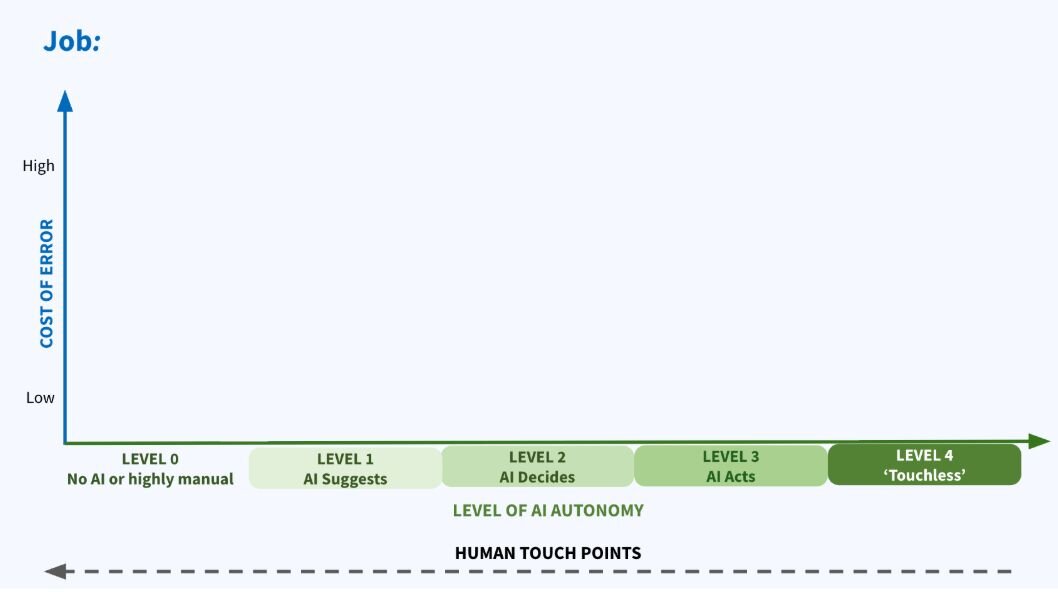
This is an ideation model designed to help us answer the question: Where in the product can AI actually improve customer experience? The model uses the four levels of AI autonomy to describe the amount of agency versus human input required when serving user Jobs to Be Done in your product. We plot each job against the autonomy level, and then against “cost of error” on the y axis to help identify areas where we can help the customer safely.
Our main incentive for moving jobs up the levels is safely reducing the number of undesired human touch points in each job, and making it easier for the user.
The goal is that everywhere a user task can be improved by assigning it to an AI, it is. The human doesn't adjudicate on the AI's decisions unless needed, resulting in less friction and time-demands for users.
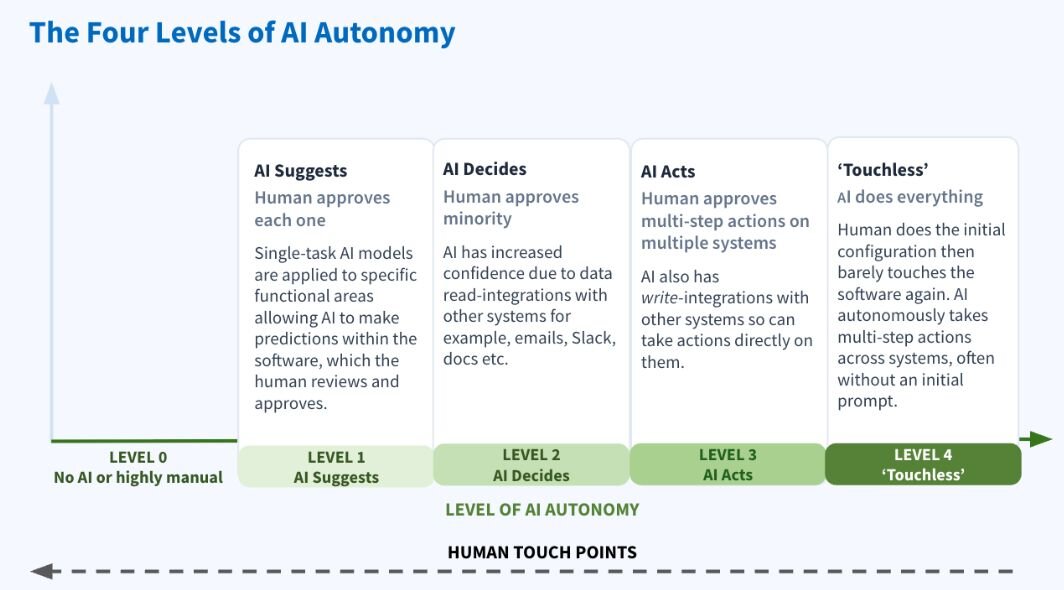
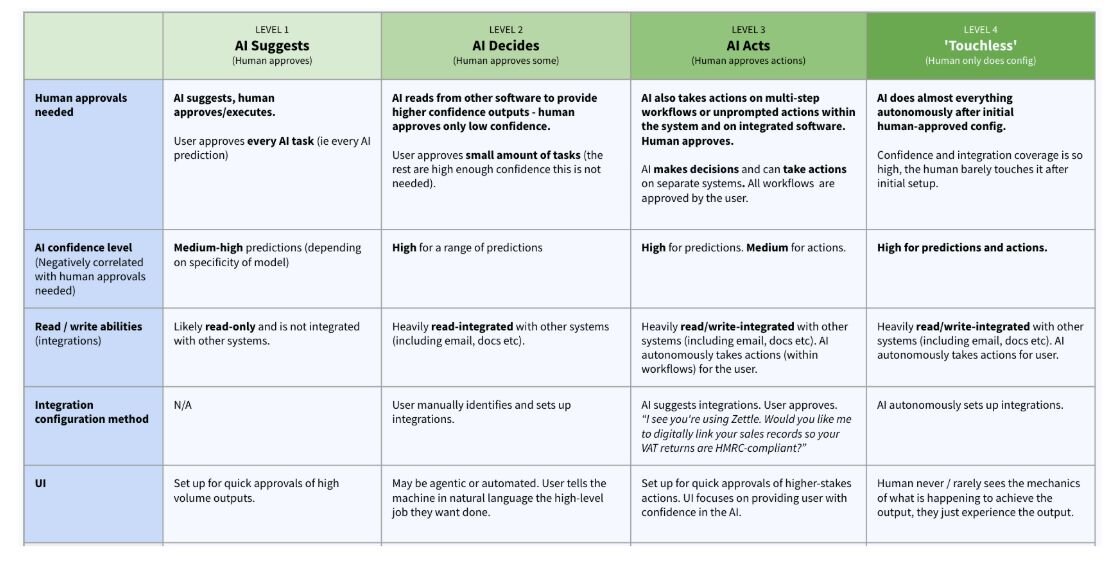
- Level 0 — There is very little or no AI used to complete the job.
- Level 1 — The human approves every single AI output or action. This is the lowest AI autonomy with the highest required human touch points.
- Level 2 — The main difference in Level 2 is that the confidence of predictions is higher, perhaps because the system is pulling in data from other sources to aid the model. This means the human only needs to approve a minority of the AI outputs.
- Level 3 — Moves AI into taking actions, including actions on other systems and multi-step workflows. The human still has a reasonably heavy involvement in approvals.
- Level 4 — The human does the initial setup, then barely touches the software; the AI does the work autonomously. This is the highest level of autonomy and is practically ‘touchless’ from the human perspective. For many jobs, this will be too high risk, but it’s a useful thought exercise to consider how the future might look
Typically, as the AI autonomy increases, we would hope unnecessary human touch points reduce for completing that job.
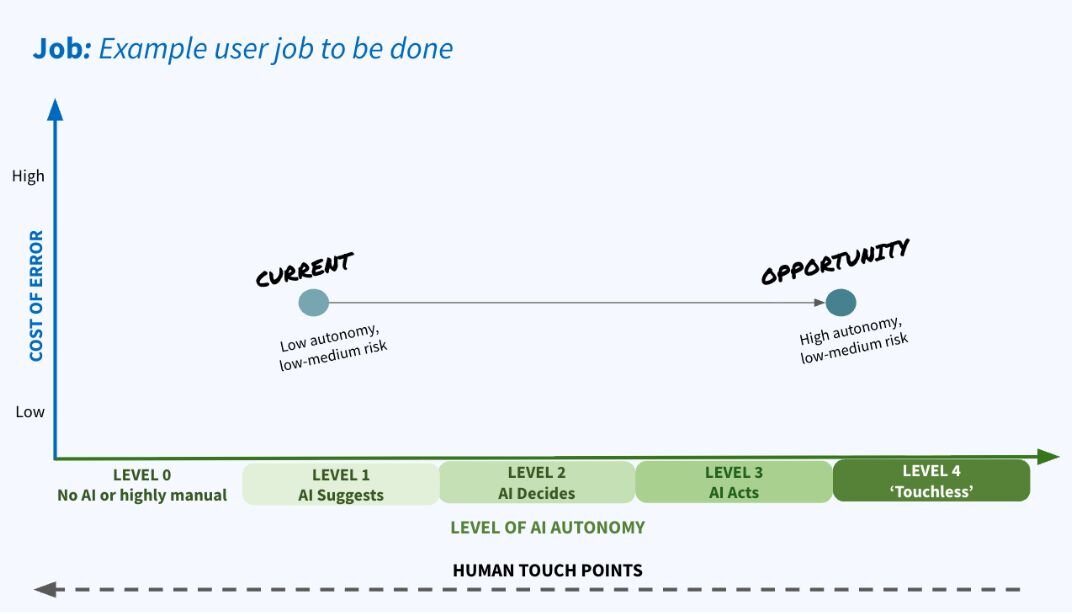
To use the model, we take each of our users’ jobs and plot where they sit on the levels. We can plot how users currently achieve the job, versus how we could help them using AI.
Let’s jump straight into an example
Let’s imagine we work at a neobank and we’re considering how we could help our small business customers access finance.
- User: Small business owner
- Job: Securing a business loan
- Job stages: Decide how much finance the business needs, find lenders and loans for which you meet lending criteria, make a decision on a lender and loan, apply for the loan, repay the loan.
The image below shows how AI could help the small business move from Level 0 (no AI) to Level 3 (AI acts), making it significantly easier and quicker for them to acquire a loan.
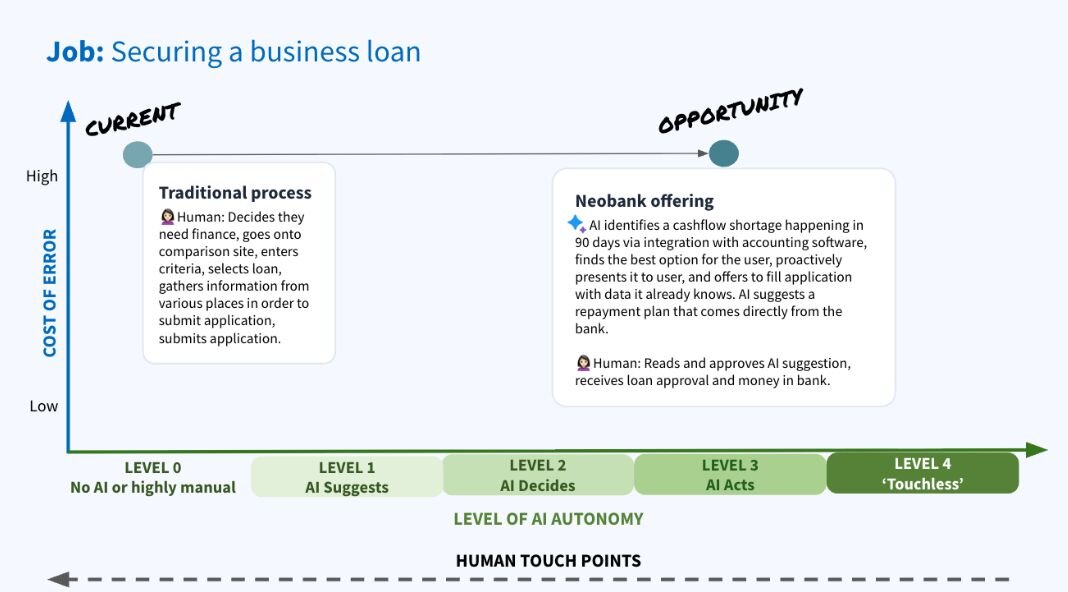
Level 4 would be too high risk for this job, as very few people, if anyone, would want AI autonomously taking out loans on their behalf at this point.
Another example
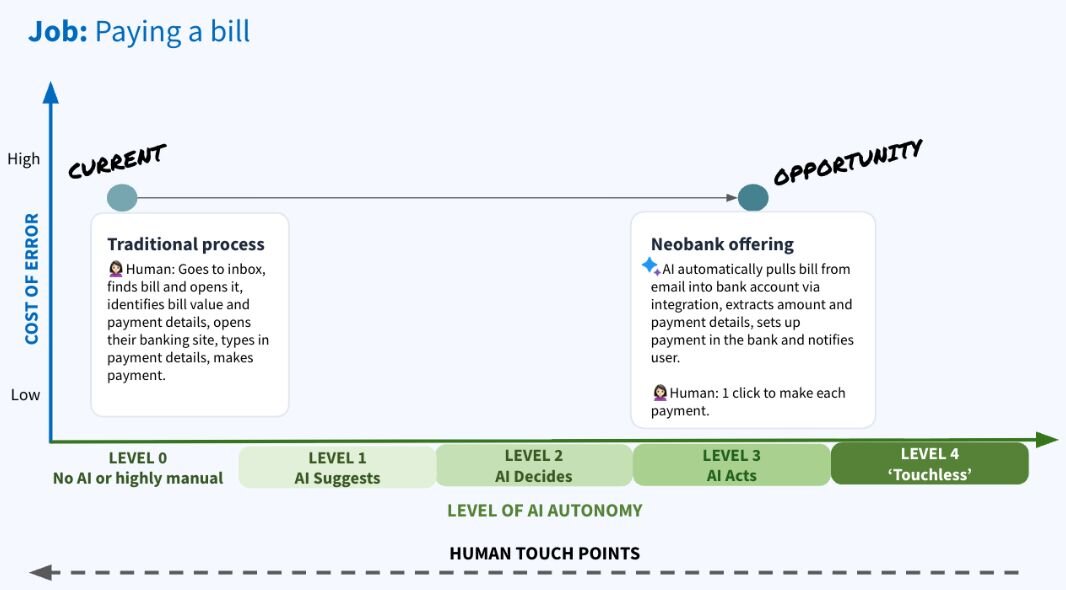
Let’s imagine we’re working at the same neobank, and want to let our business customers easily pay the bills that come in from their suppliers.
- User: Small business owner
- Job: Pay a bill
- Job stages: Find and retrieve a bill (for example in email inbox), find out how much needs to be paid and who it needs to be paid to, pay bill.
The image below shows how AI could help the small business move from Level 0 (no AI) to Level 3 (AI acts) by creating integrations with email providers, extracting the correct emails using AI, extracting text from documents using AI and automatically setting up payments.
How to use it in practice
In practice, you would take all the core Jobs to Be Done of your users and plot them on copies of the chart (see Appendix 2 for a template).
Step 1: Decide the opportunity level (ignoring risk)
To help with creativity and brainstorming, I find it most helpful to start without consideration of risk. That can (and needs to) come later.
The first step, therefore, is plotting each job’s current and opportunity states on the x-axis only (ignoring the y-axis for now). The opportunity state is largely based on the current capability of AI in relation to the job, combined with standard automation, which could supplement the AI.
Opportunity level can be decided using your own knowledge of AI capabilities, or using an LLM like Claude or ChatGPT. It can also be helpful to include a data scientist or other AI expert in this process.
Step 2: Decide the ‘cost of error’ rating of each job
We now need to decide roughly what the cost of error for the job is — i.e. what are the consequences if the system gets it wrong? (This will always be the same for the current and opportunity states of the job since it’s about the job itself). For example:
- User cost of an error: If the action of the AI could result in the user losing money, damaging their reputation or breaching regulations, it’s not recommended, given current AI capabilities, to move this job to Level 4 — ‘Touchless’.
- Cost to your company of an error: An incorrect outcome may not have a significant cost to the user, but it could alter the trust they hold in your brand. It could also cause other costs if AI overpaid a user (say in an e-commerce refund) or unintentionally gave away free products (for example extra usage credits).
- Regulatory considerations: There are some areas in which it would not be wise to give AI too much autonomy. For example, it’s unlikely you would want to risk the AI providing directive financial advice to the user, as it could lead to lawsuits.
Your cost-of-error level may now cause you to pull the opportunity for the job towards the left of the x-axis (resulting in less AI autonomy). Generally, a higher cost of error will mean less autonomy is possible.
These two steps will provide you with a set of jobs where AI could help users in your product.
The quadrants in the diagram below can act as prioritisation guidance for your users’ jobs in relation to AI.
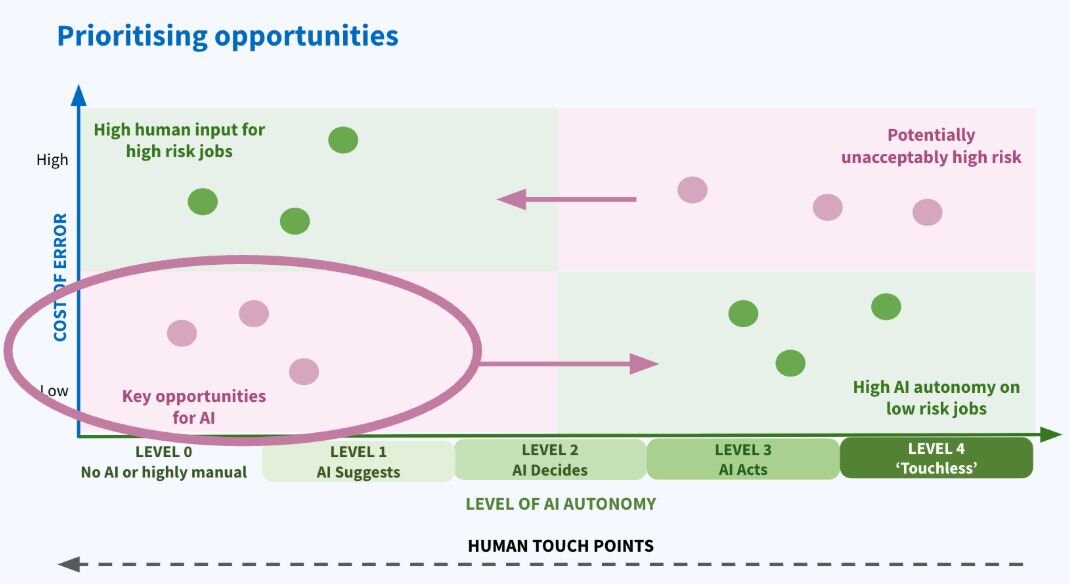
The pink quadrants show where there is potentially an autonomy-risk mismatch. Current jobs in the bottom left quadrant are key routes of investigation for increasing AI autonomy. Take time to ideate how you could move these right along the x-axis.
Green shows where we probably want our jobs to sit; high AI autonomy in low risk jobs, and high human input in high risk jobs.
Once your opportunity ideas are plotted, you would prioritise and validate them as normal, considering factors such as engineering complexity and user reach.
Some other usage notes
- The levels are not mutually exclusive and not all jobs will fit perfectly into one level. That’s okay and they can be put in between levels.
- The model focuses on AI since many people are investigating its potential. Of course, there are many other ways of helping users achieve their jobs more effectively, for example through simple rule-based automation. In many cases this will be as good as or better than AI.
I hope that was useful. Feel free to message me on LinkedIn.
Appendix 1: Detailed characteristics of Levels 1–4
Appendix 2: Blank Levels template on which Jobs to Be Done can be plotted